
Ever wish your dashboards could give you real answers, predict what’s next, or just show up-to-date information? Microsoft Fabric’s Real-Time Intelligence (RTI) is your new best friend. With new features and big Ignite announcements, RTI makes it easier than ever to turn live data into real decisions. I’ll cover what it is, what’s new, what’s coming, and why it matters.
RTI in Microsoft Fabric has made huge strides in 2025. With built-in anomaly detection, better event stream processing, and Copilot-powered queries, it’s now a powerful toolkit for building smart, responsive data systems. RTI means you can analyze and act on data as it happens. You can spot supply chain issues, optimize retail, or monitor infrastructure in real time, helping you make faster, smarter decisions.
Real-Time Intelligence, real quick
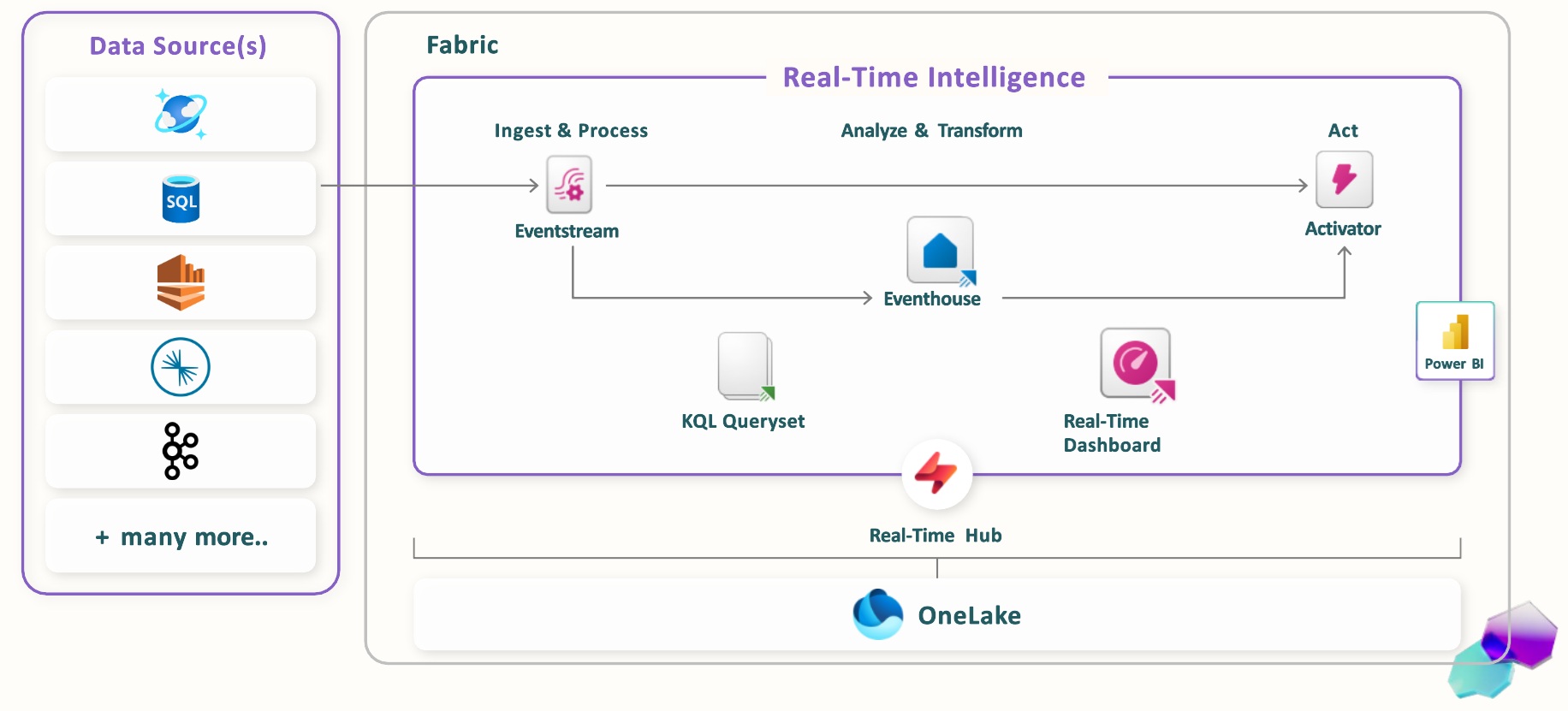
Image courtesy of Microsoft – Real-Time Intelligence in a Day workshop
For those of you unfamiliar with RTI, here is a crash course on the components:
-
Eventstream – An ingestion and transformation tool that can handle to volume and scale of real time events whether they are machine signals or user actions on a website
-
Eventhouse – Storage optimized for ingesting and analyzing real time data
-
KQL Queryset – A place to keep and share your Kusto Query Language (KQL) queries. KQL is designed to handle large data sets quickly. FUN FACT: Kusto is named after the famous explorer "Jacques Cousteau." You can explore data in much the same way Cousteau explored the briny deep.
-
Activator – Monitors data in real time and fires off messages to Teams or email when conditions are met, such as failed orders per user or customer calls in queue.
-
Real Time Dashboard – Power BI designed to ingest and display real time data. Includes auto-refresh options and tools such as real-time mapping of location data.
What’s new?
The fun and headache of Microsoft Fabric is the speed at which new features are released. Yay! Something new! Crap! Something new to figure out! Here are my favorite improvements to RTI that have been released over the past five months:
Pause and resume for eventstream’s derived streams
Managing Fabric capacity can be time consuming and frustrating; even more so when you cannot pause a resource that is eating up value CUs in your test and dev environments. Your only other option in the past was to delete when you were done. And who ever did that?
Good news! You can now pause your traffic for your derived stream. This capability gives you more control and flexibility over their event-driven workflows.
-
Save on Costs: Pause event traffic during slow times or maintenance—no need to delete or rebuild streams.
-
Stay Up and Running: Instantly resume traffic when you’re ready, so there’s less downtime and no complicated setup.
-
Use Resources Smarter: Adjust throughput as your business needs change, making your system more efficient.
Read all about it: Pause and resume data streams
Managed Private Endpoints (MPE) for eventstream
If you work in a highly regulated industry or are just a big fan of securing your data, you are going to be happy to use MPE for Eventstream.
You can securely connect Azure Event Hubs and Azure IoT Hub to Eventstream. All data ingestion goes over a private network. It helps you meet strict security and compliance requirements by keeping your data streaming and processing within a trusted boundary.
Get started today: Connect to Azure resources securely using managed private endpoints.
Use SQL to transform eventstream data
Not ready to explore the depths of your data with KQL? Inwardly groaning and sighing at the prospect of learning yet another language (LYAL)? Then you will be thrilled to know that your old pal SQL can be used to transform data in eventstream.
You’re welcome!: Process Events Using a SQL Operator
Query Azure Monitor data in a KQL queryset
Your own Azure tenant is a fantastic candidate for RTI. Whether it is an unexpected spike in cost or unexpected access, the sooner you can investigate it, the less the impact.
Now, you can connect to Azure Monitor right from a KQL queryset. No need for manual connection strings. Just enter your Azure details and you’re good to go.
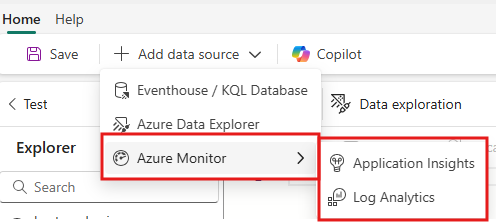
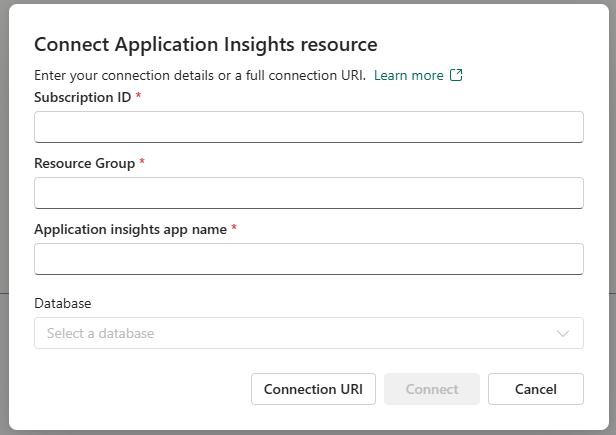
You enter the details, and Fabric makes the magic happen.
Who cares?
You should!
Unless your business model relies on you being the last to know something, I am sure there is a use case where you could benefit from getting more accurate data sooner.
Still stumped? Here are some inspirational tales that should help you find some use cases in your own backyard:
-
Unity Technologies lost $110 million when its ad targeting engine relied on stale data, leading to poor predictions and a 37% stock drop.
-
British Airways and a European e-commerce firm were fined millions for GDPR violations because they couldn’t detect threats in real time.
-
Uber underpaid drivers by 2.6% over 2.5 years, resulting in a $45 million hit; all because of delayed data reconciliation.
What’s next?
Here are some announcements we are hoping to hear at Microsoft Ignite, November 18–20.
Azure Monitor DCR to Eventhouse – Public Preview
Azure Monitor Data Collection Rules (DCRs) let you route data from the Azure Monitor agent (AMA) to various destinations, such as Azure Log Analytics and Event Hub. With the latest update, you can now send this data directly to a Fabric Eventhouse or an Azure Data Explorer cluster. When you do, destination tables are automatically created with the correct schema, making setup easier and ensuring your data is organized properly.
Eventhouse Monitoring – General Availability
You can use Eventhouse logs and metrics to optimize performance, resolve problems, and detect anomalies. Eventhouse provides detailed reports on query activity, data ingestion metrics, and any ingestion failures. All event and metric logs are stored in a read-only KQL database, which users can analyze using KQL Querysets and Real-Time Dashboards.
Eventstream to Activator Destination – General Availability
Activator continuously watches real-time data as it flows into Microsoft Fabric via Eventstream. When specific conditions or patterns are detected, Activator can automatically trigger actions, such as sending alerts, updating dashboards, or launching workflows—so you can respond instantly to important business events.
Ready to learn more?
I didn’t use the Magic 8 Ball or a predictive model. I just looked at the Fabric Product Roadmap.
Super excited for Real-Time Intelligence? Reach out to me at scott.hermes@valtech.com to find out how we can help you turn your real time data into insights that lead to business value.
What are your predictions for the future of Fabric? What improvements are you looking forward to?